Which edition includes the Digital World Compendium?
Bandai Namco lists the Digital World Compendium in the Eclipse Edition Digital Upgrade, which is also included with the Collector’s Edition.
 Dawnwalker Guide
Content updated:
The Digital World Compendium is a digital art-and-lore extra about Vale Sangora and its history. It comes with Eclipse digital content, also included in Collector’s Edition. It is not the prequel comic or the separately listed physical hardcover, and it does not add gameplay systems.
It is a digital art-and-lore companion to Vale Sangora, the setting of The Blood of Dawnwalker. Bandai Namco describes a visual introduction to the world and its past. The publisher separates it from the prequel comic and music collection; none of these extras changes the gameplay systems. Bandai Namco: Edition guide.
For a player choosing an edition, the useful distinction is reading about the setting versus unlocking more game content. Do not buy it expecting new quests, equipment or an interactive map. For help during a playthrough, start with the gameplay guide instead.
| Purchase | Digital compendium | Printed book |
|---|---|---|
| Standard | Not included | Not included |
| Day One | Not included | Not included |
| Eclipse Edition | Included | Not included |
| Eclipse digital upgrade | Included; check base-game requirements | Not included |
| Collector’s Edition | Included with Eclipse digital content | 60-page hardcover listed |
The official product list distinguishes the digital extras from the physical World Compendium. The 60-page specification belongs to that hardcover: it does not establish the digital edition’s length or prove identical contents. Official Bandai Namco game page.
Already own Standard or Day One? Bandai Namco says the Eclipse extras can be added later. Compare the Eclipse upgrade and full-edition bundle rather than paying for the base game twice. For a book to display, use the Collector’s contents guide.
Start at the title screen and look for Extras. Game Rant’s 2 September access guide shows that menu in a screenshot and reports that it contains the digital compendium, comic and soundtrack. The screenshot labels the menu Extras, although the article text calls it “Extra”. Game Rant: Eclipse digital extras access (2 September 2026).
This route is based on Game Rant’s reporting and title-screen capture, not our own playthrough or a platform-by-platform test. We have not verified the subsequent screens on Steam, GOG, PS5 and Xbox. The article discusses a prologue requirement for the armor reward separately; we have not established a prologue requirement for reading the digital extras.
Rebel Wolves now provides the soundtrack as a standalone Steam Library item for owners of Eclipse Edition Content. In your Library, choose the Soundtracks sub-folder, select The Blood of Dawnwalker soundtrack and download it. The publisher says both MP3 and WAV files are available for listening in Steam or from local files. Rebel Wolves: Soundtrack Release.
The soundtrack cannot be bought separately according to that announcement. Confirm that the same Steam account owns Eclipse Edition Content before buying anything again. This download route is for Steam; it does not establish an identical Library menu on GOG, PS5 or Xbox. It also does not move the digital compendium or comic into Steam’s Soundtracks sub-folder.
Start with the purchase, before reinstalling the game or buying another copy:
In the Steam desktop client, open your Library, right-click The Blood of Dawnwalker and choose Properties, then DLC. Steam’s support guide says this panel shows the add-ons your account owns and their installation status. Check the names shown against your receipt; the base game appearing in your library does not by itself confirm ownership of the digital extras. Steam Support: Find and manage DLC.
If the purchased content is absent, recheck the purchasing account and any supplied activation code. If it is owned but not installed, use Steam’s DLC management controls. If it is already installed and you still cannot find the book, tell support precisely that. This is a verified Steam menu path, not a verified Dawnwalker file location or book-opening procedure.
On PS5, open Game Library, then Your Collection, select the game and scroll to its add-ons. PlayStation’s instructions say downloadable add-ons can be selected there and downloaded. If the purchase cannot be found, check the account’s transaction history. PlayStation Support: Download games and add-ons.
Use this to check whatever Eclipse content is actually listed for your purchase. We have not verified that the compendium appears as an individually named add-on or that downloading one creates a particular in-game menu. If the entitlement exists but the book remains inaccessible, use PlayStation’s linked add-on support rather than purchasing it again.
Use the platform and account named on the receipt or code instructions. Do not apply a Steam library path to a console or assume a boxed code is a direct book download. We have not verified a Dawnwalker-specific opening route for these purchases, so no menu sequence or installation folder is asserted here.
| What you can see | Useful evidence to collect |
|---|---|
| The extra is not listed as owned | Edition name, purchasing platform and whether a supplied code was redeemed |
| Owned, but not downloaded | The add-on installation status and any download error |
| Downloaded, but cannot open it | Where you looked, the visible product name and the exact error or missing option |
| A physical package is missing an item | The seller’s contents list and whether the issue concerns the printed book or digital code |
Ask: “I purchased [edition] for [platform]. My digital extras show [ownership / installation status], but I cannot access the Digital World Compendium. Where should this purchase open, and is a separate redemption required?” Share receipts and order identifiers only through the store’s private support channel. Do not share passwords or activation codes publicly.
The publisher overview does not publish a complete table of contents, digital file format or platform-by-platform opening instructions. We have not inspected the complete book. We therefore do not claim it is a PDF, give an invented installation folder, or provide an unofficial download.
Choose by the question you want answered. An interest in world art points toward the compendium; a need for combat help points toward skills and customization. Exploring the valley? Use the world and map guide. Comparing the full purchase? See all four editions.
If you prefer discovering characters and places unaided, consider reading supplementary world material after playing. That is a spoiler-avoidance suggestion, not a claim about chapters we have not seen.
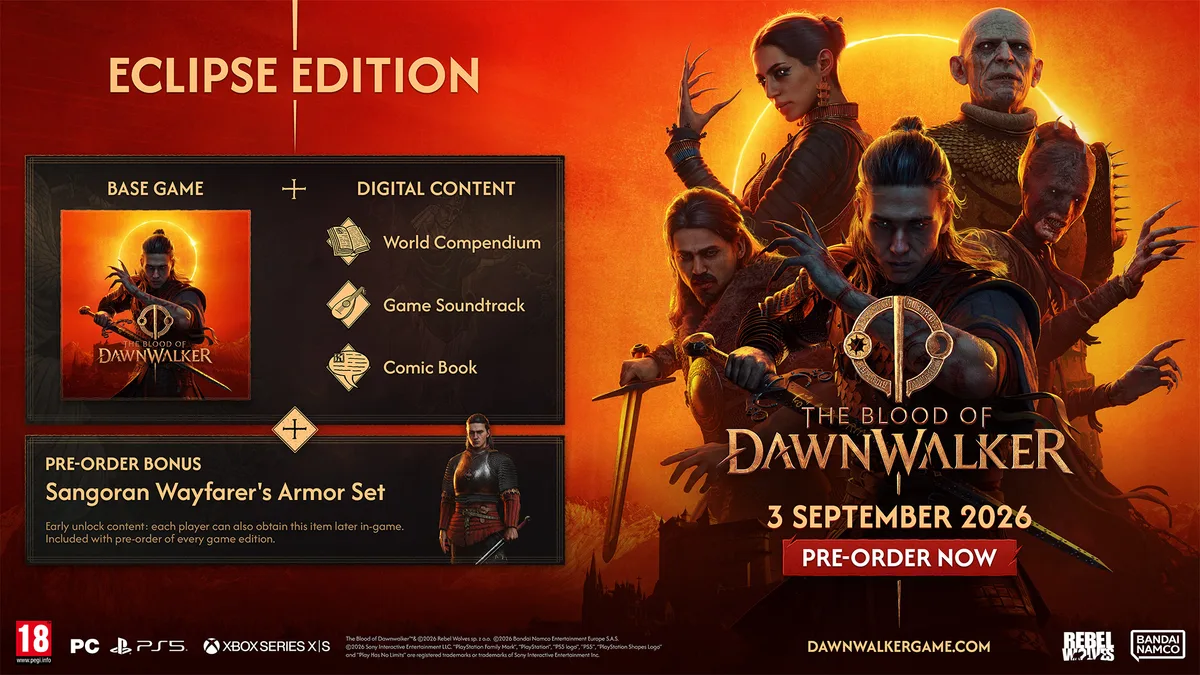
The publisher’s Eclipse package artwork lists the World Compendium alongside the soundtrack and comic. This is a bundle illustration, not a preview of the compendium’s pages. Its pre-order banner is historical; check current store terms for bonus eligibility.
Read the official edition guide ↗Bandai Namco lists the Digital World Compendium in the Eclipse Edition Digital Upgrade, which is also included with the Collector’s Edition.
They are listed separately: the Collector’s Edition names a physical World Compendium as a boxed item as well as the Eclipse digital content.
Bandai Namco describes an artistic introduction to Vale Sangora and its history. A complete chapter list and digital file format are not specified in the publisher overview; the separately advertised 60-page count refers to the physical hardcover.
The Blood of Dawnwalker Eclipse Edition includes the game plus the Digital World Compendium, digital comic book and digital soundtrack. The Sangoran Wayfarer Armor Set early unlock was a separate pre-order benefit, not an unconditional purchase extra. Store price and regional availability must be checked live.
Read guide →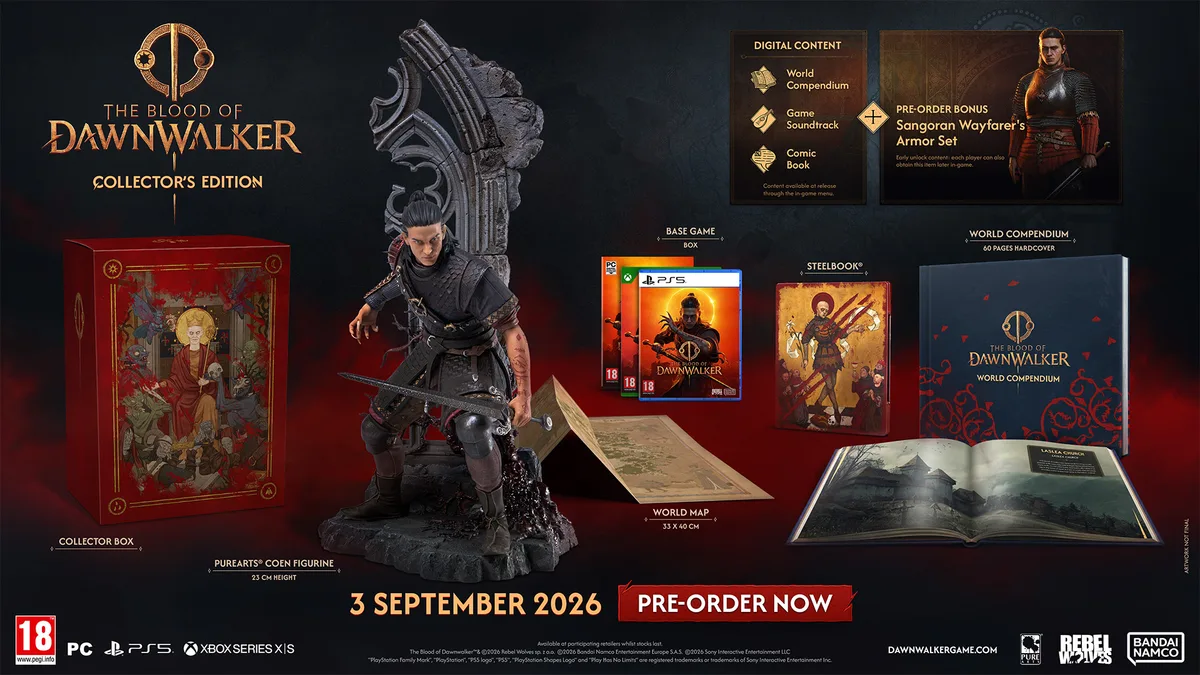
The Blood of Dawnwalker Collector's Edition includes the game, Steelbook, world map, Coen figurine, physical World Compendium, Eclipse digital content and regional extras such as stickers. The armor early unlock was a separate pre-order offer. Availability varies by region.
Read guide →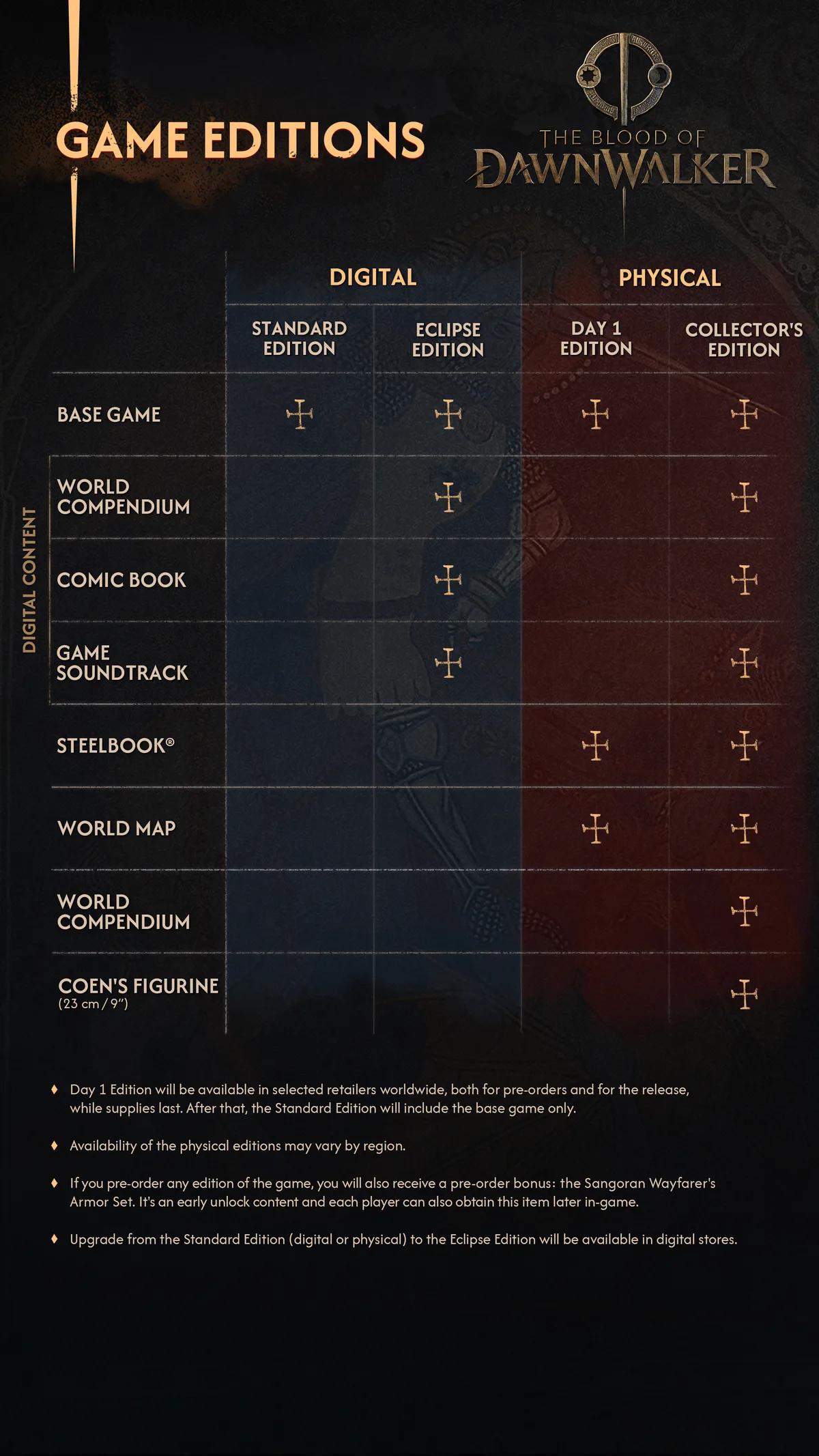
The official game page lists Standard, Eclipse, Day One, and Collector’s Editions. All include the same game; extras range from digital lore and music to a map, Steelbook, book and figurine. The armor early unlock was a separate pre-order offer, subject to eligibility.
Read guide →Regional store options, availability, and purchase terms can change. Use Bandai Namco’s official game hub for the current version.