Is The Blood of Dawnwalker available on PC?
Yes. Bandai Namco lists the game as released on PC on 3 September 2026 and links the PC version to Steam.
 Dawnwalker Guide
Content updated:
The Blood of Dawnwalker is available on PC. For crashes, stutter or missing controller input, first isolate the symptom: compare hardware, verify the Steam installation, or check the controller connection. These are troubleshooting checks, not guaranteed game-specific fixes.
For account and storefront compatibility, use the cross-save ownership matrix before changing devices.
If Dawnwalker will not launch, crashes, stutters or ignores a controller, start by separating those problems. A graphics preset will not repair an undetected controller, and reinstalling the game is not the first useful test for every slow frame. These are conservative PC troubleshooting checks, not fixes we have reproduced against a particular Dawnwalker bug.
| What happens? | First useful check | Keep a record of |
|---|---|---|
| Nothing launches or the game closes immediately | Finish pending installation updates; on Steam, verify the files using the steps below. | The error text and whether the launcher or game closes |
| A crash at the same scene | Repeat from an available save without changing several settings at once. | The scene, installed build and reproducible actions |
| Slow or uneven performance | Compare hardware with the requirements, then repeat the same scene with one graphics change. | Resolution, preset and whether the slowdown is constant or intermittent |
| Keyboard works but controller does not | Separate device connection from game support using the controller checklist. | Controller model, connection method and storefront |
| Movement works but a combat action does not | Check the current binding and the action available to your form. | The action name, day or night, and the displayed binding |
Before changing drivers or input profiles, finish the game updates offered by your storefront and record the installed version. The developer’s published notes distinguish these fixes:
| Symptom or feature | Published update | What the developer reports |
|---|---|---|
| Controller sprint input or dead-zone behaviour | 1.0.2 — PC | Adjustments to controller dead zones and sprint input; not a universal controller repair. |
| DualSense on Steam | 1.0.3 — Steam | Added DualSense support; the note does not list every connection mode or feedback feature. |
| FPS drops when connecting a controller | 1.0.4 — Steam | Addresses drops associated with outdated GameInput software. |
| Unable to save | 1.0.4 — Steam | Fixes an issue that prevented saving; does not promise recovery of lost saves. |
| Stuttering | 1.0.5 — Steam | Changes to shader compilation may help some users; not a guarantee that all stutter is fixed. |
Sources: Rebel Wolves on Steam: Hotfix 1.0.2; Rebel Wolves on Steam: Hotfix 1.0.3; Rebel Wolves on Steam: Hotfix 1.0.4; Rebel Wolves on Steam: Hotfix 1.0.5.
These are the publisher’s patch claims, not our hardware tests. A later installed build does not prove your remaining symptom has the same cause. Retest the same scene after updating; for controller-related slowdowns, record whether they begin when the controller is connected. Continue with the checks below if the issue remains. Do not uninstall GameInput, update BIOS or delete saves simply because a symptom sounds similar. These PC/Steam notices do not establish console patch availability.
Start with the minimum and recommended hardware table. Compare the full CPU and GPU model names, RAM and SSD space, not just an “i7” label or graphics memory capacity. Meeting a requirement is not a measured frame-rate result at your resolution.
For a useful comparison, use the same save, location and camera route. Write down your installed build, resolution and graphics preset. Change one available graphics option, repeat the route, and keep the change only if it improves the problem you notice. If you also alter resolution or an upscaling setting, record it: those runs are no longer a like-for-like image-quality comparison.
A steady low frame rate and occasional pauses deserve separate notes. Describe whether a pause happens during exploration, combat or entering an area. Do not label it “shader compilation” or “a memory leak” without evidence. This guide does not offer a tested universal preset, a guaranteed 60 fps target or a Steam Deck performance verdict.
For missing content or crashes, Steam provides this installation check. It applies to the Steam copy, not GOG or Xbox PC. Steam Support: Verify integrity of game files.
Verification checks the installation; it is not a driver repair or a recovery tool for an overwritten save. Do not delete save folders to perform it. If you use mods, record what you installed and its removal instructions before further changes.
Start with the manufacturer's connection instructions and the controller-support information on the game storefront. A device appearing in Windows does not establish support for every game or feature.
For DualSense, PlayStation documents USB Type-C and Bluetooth connections on supported Windows systems. Its PC haptic feedback requires both USB and game support. This is not confirmation that Dawnwalker supports every DualSense feature. PlayStation Support: DualSense connections on PC.
Work through these checks in order; stop when you identify where input fails:
| Check | What the result tells you | Next step |
|---|---|---|
| Does the PC detect the controller? | If not, game graphics settings are irrelevant. | Check the cable or pairing using the manufacturer’s instructions. Use a data-capable cable for a wired comparison. |
| Does it respond in another supported game? | Failure in both suggests a broader connection issue; success narrows the problem. | Record the working game and connection method for support. |
| Does Dawnwalker respond to any controller input? | No input and a single missing action are different symptoms. | Compare menu navigation, movement and the exact action that fails. |
| Are remapping utilities or custom profiles active? | An extra input layer is another test variable. | Record your setup, compare one reversible profile change at a time, and restore it if it does not help. |
We have not verified a Dawnwalker-specific Steam Input override that fixes all controllers. Do not apply another game's instructions as a guaranteed solution, or install several controller emulators together to test an unexplained claim.
If movement and menus work but switching an attack does not, check the binding displayed in your current controls and whether Coen is in daytime or nighttime form. The combat and day/night guide explains the forms; that is separate from connection troubleshooting. This guide does not invent a keyboard shortcut for switching claws and sword.
Steam, GOG and Xbox PC are not interchangeable names for one purchase. GOG explicitly offers offline installation; Xbox’s announcement identifies PC and cloud access. GOG product listing and DRM FAQ; Bandai Namco on Xbox Wire: World and Xbox platforms.
| Store | Why investigate it | Do not assume |
|---|---|---|
| Steam | Steam library and listed features | Ownership also unlocks Xbox |
| GOG | DRM-free installation; optional Galaxy | Its policy describes every store |
| Xbox PC | Xbox ecosystem and supported cloud access | Cloud access means Game Pass catalogue inclusion |
Provide your storefront, game build, Windows version, exact CPU/GPU, RAM and symptom. Include a short reproduction sequence and the result of each check. For controller issues, include its model, connection method and whether keyboard input works. For performance, include resolution and settings alongside any measurement.
Crop screenshots to the relevant error or setting. Remove account names, email addresses and personal paths from publicly shared logs. Before actions that could risk your progress, read the save-protection checklist.
Avoid replacement executables or “optimization” downloads that cannot explain their changes. Buying another edition is not a first diagnostic step.
Use the Steam page for store-specific checks and the DRM page for the verified offline option. Neither substitutes for matching your machine to the game’s hardware needs.
Steam, GOG and Xbox PC offer different library and installation choices. Compare those options before setting up the game.
Open the official game page ↗Yes. Bandai Namco lists the game as released on PC on 3 September 2026 and links the PC version to Steam.
Separate PC detection, connection method and game support. Compare menu input with the missing action, and record any remapping profiles. There is no verified universal Dawnwalker Steam Input override in this guide.
Requirements help compare hardware, but do not guarantee a frame rate. Compare the same scene, resolution, settings and game build; this guide does not claim tested Steam Deck results.
Bandai Namco lists Windows 10, DirectX 12, 16 GB RAM, and 60 GB of SSD storage for The Blood of Dawnwalker. Minimum and recommended CPU and GPU models are shown on the official game page.
Read guide →
The Blood of Dawnwalker has an official Steam listing for PC and released on 3 September 2026. Use the live Steam page together with Bandai Namco’s game page to confirm the current price, regional availability, language details, and PC requirements before purchase.
Read guide →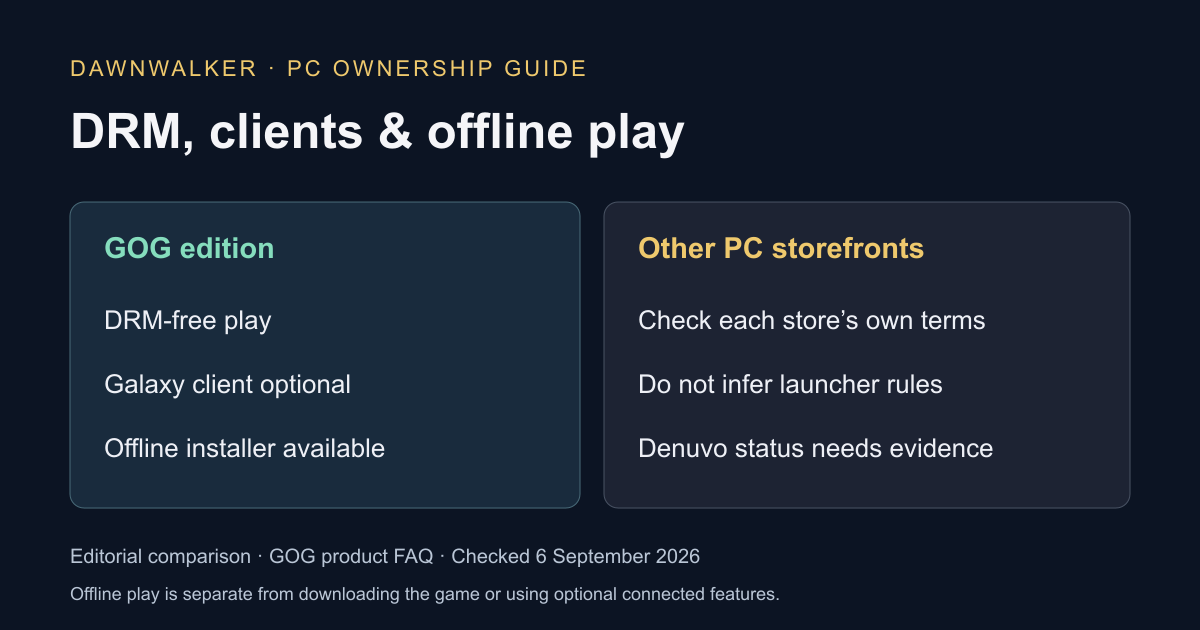
The GOG version is explicitly sold DRM-free, with an offline installer and no requirement to use GOG Galaxy. That gives PC players a verified option without Denuvo; do not assume a storefront’s policy automatically describes every other edition.
Read guide →Regional store options, availability, and purchase terms can change. Use Bandai Namco’s official game hub for the current version.